 ai-process
Architecture & Full-Stack Deployment
The ai-process ecosystem consists of two core backend services and an optional web console:
- KTMS (
ai-process/ktms, formerlyllm-proxy) — Self-hosted LLM gateway. Holds encrypted vendor API keys, routes requests byeffortand free-form attributes across model fallback chains, enforces Redis-backed RPM and daily token budgets, and streams usage events. - light-tokenmeter (
ai-process/light-tokenmeter) — Lightweight token usage meter. Receives one event per model call over gRPC or HTTP, stores them idempotently in a single append-only Postgres table, and serves daily multi-dimensional summaries to identify greedy vs. worthy token consumers. - ktms-admin (
ai-process/ktms-admin, formerlyllm-proxy-admin) — Web console for managingKTMS(models, rules, API keys, vendor credentials, prompt playground) and visualizing usage and cost fromlight-tokenmeter.
How They Fit Together
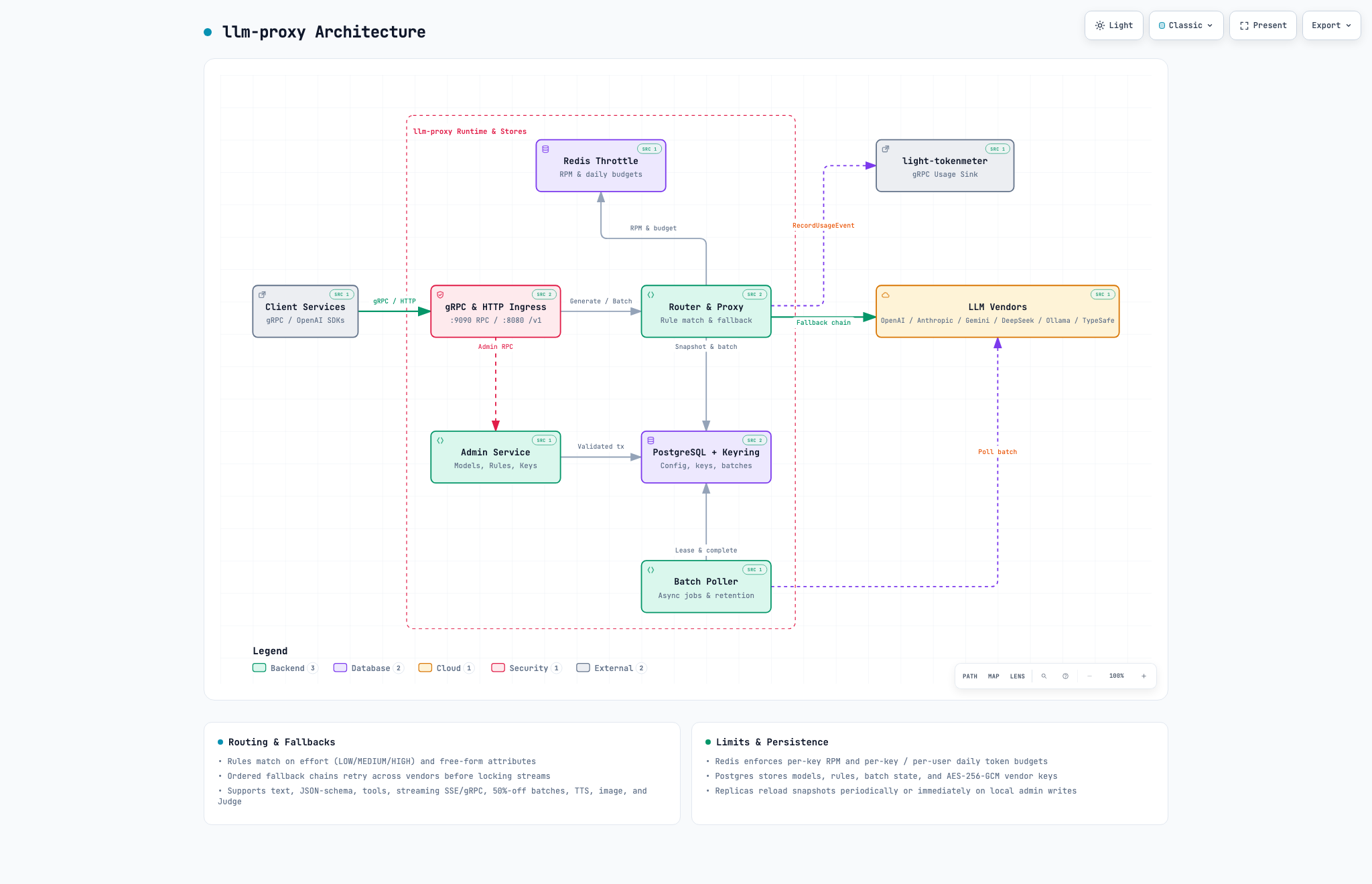
KTMS Architecture
-
Interactive HTML: diagrams/ktms.htmlSpec: diagrams/ktms.architecture.json
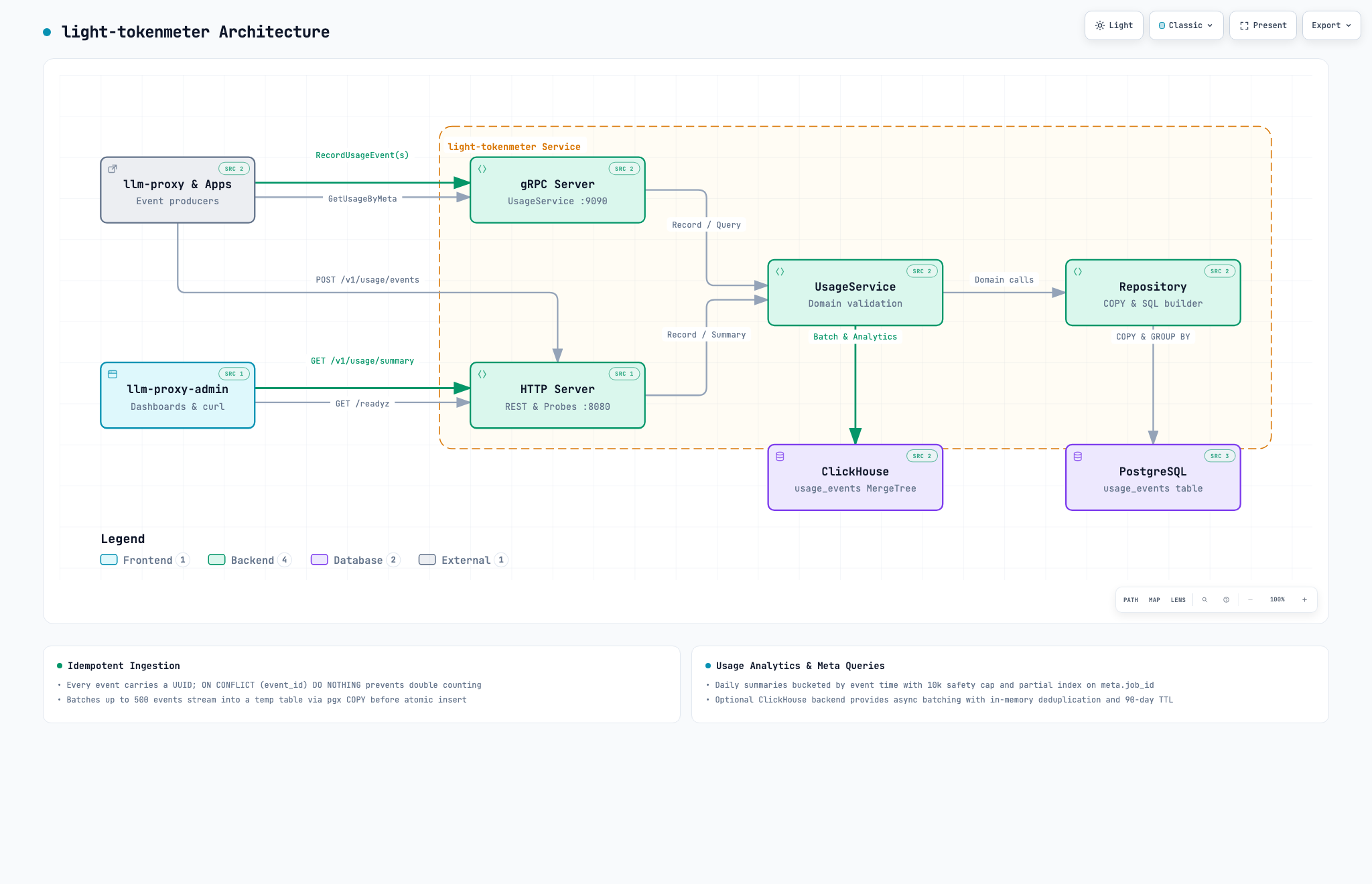
light-tokenmeter Architecture
-
Interactive HTML: diagrams/light-tokenmeter.htmlSpec: diagrams/light-tokenmeter.architecture.json
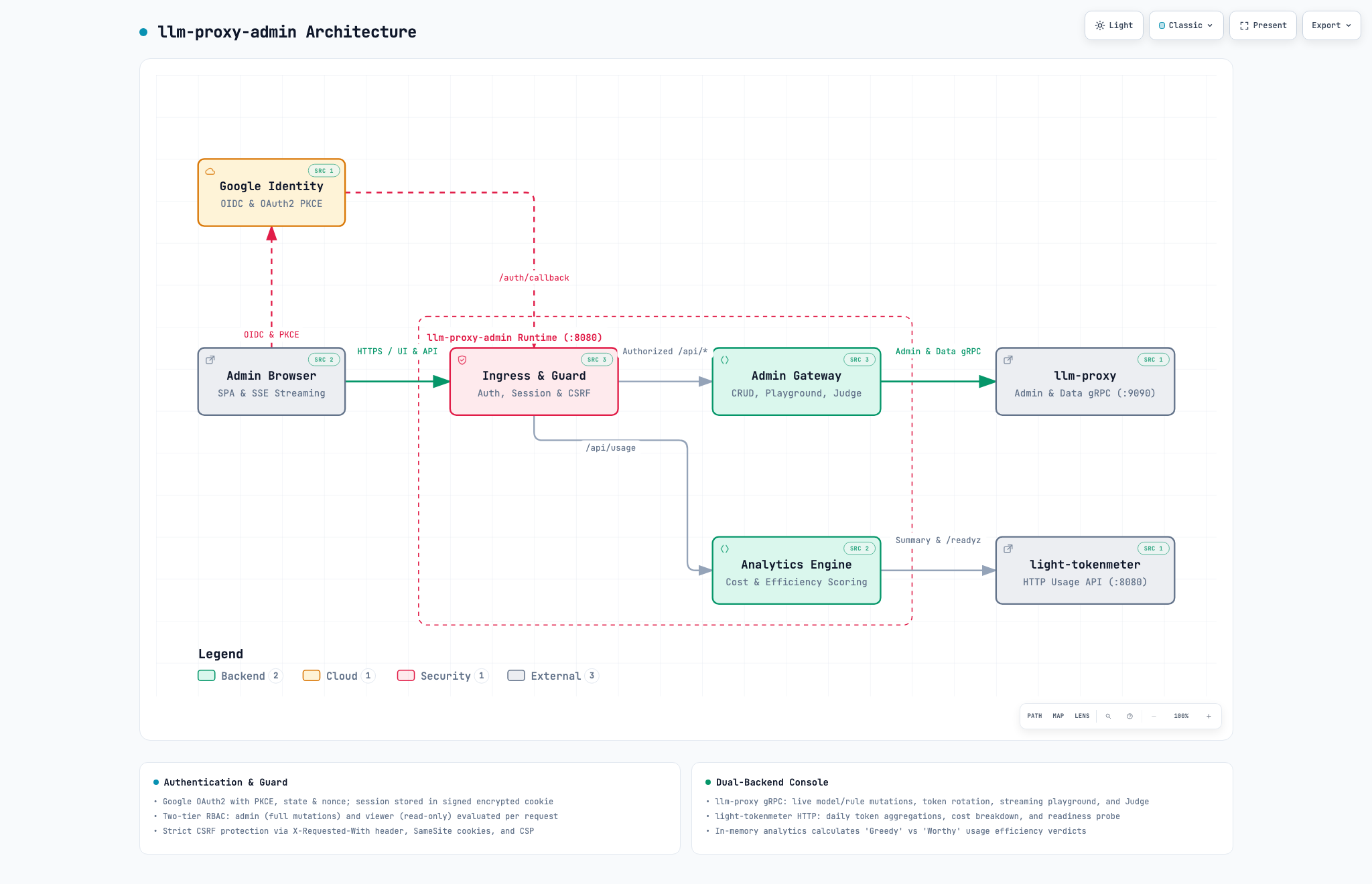
llm-proxy-admin Architecture
-
Interactive HTML: diagrams/llm-proxy-admin.htmlSpec: diagrams/llm-proxy-admin.architecture.json
Client Applications
  ├── gRPC (:9090, Bearer ktms_…) ─────┐
  └── OpenAI HTTP (:8080/v1) ──────────┼──▶ KTMS ──▶ OpenAI / Anthropic / Gemini / DeepSeek / Ollama / TypeSafe
                                       │     │   │
                     Postgres (ktms) ◀─┘     ├──▶ Redis (RPM & daily token budgets)
                                             │
                                             └──▶ light-tokenmeter (:9090 gRPC / :8080 HTTP)
                                                          │   ▲
                                    Postgres (tokenmeter) ◀   │ (:8080 HTTP)
                                                              │
Browser (Google OAuth) ──▶ ktms-admin (:8081) ────────────────┘ (also manages KTMS :9090 gRPC)
Running the Whole Stack (Docker Compose)
Below is a complete compose.yaml running KTMS, light-tokenmeter, ktms-admin, Postgres 16, and Redis 7:
services:
  db:
    image: postgres:16-alpine
    environment:
      POSTGRES_USER: postgres
      POSTGRES_PASSWORD: ${DB_PASSWORD:-postgres}
    volumes:
      - pgdata:/var/lib/postgresql/data
      - ./init-db.sql:/docker-entrypoint-initdb.d/init-db.sql:ro
    healthcheck:
      test: ["CMD-SHELL", "pg_isready -U postgres"]
      interval: 3s
      retries: 20

  redis:
    image: redis:7-alpine
    restart: unless-stopped

  ktms:
    image: coyl/ktms:latest
    depends_on:
      db:
        condition: service_healthy
      redis:
        condition: service_started
    environment:
      DATABASE_URL: postgres://postgres:${DB_PASSWORD:-postgres}@db:5432/ktms?sslmode=disable
      KTMS_ENCRYPTION_KEYS: "${KTMS_ENCRYPTION_KEYS:?generate with echo '1:...' (see bootstrap steps)}"
      BOOTSTRAP_ADMIN_KEY: ${BOOTSTRAP_ADMIN_KEY:-}
      REDIS_ADDR: redis:6379
      USAGE_COLLECTOR_HOST: light-tokenmeter:9090
    ports:
      - "9090:9090"
      - "8080:8080"

  clickhouse:
    image: clickhouse/clickhouse-server:24.3-alpine
    environment:
      CLICKHOUSE_DB: tokenmeter
      CLICKHOUSE_USER: tokenmeter
      CLICKHOUSE_PASSWORD: ${CLICKHOUSE_PASSWORD:-tokenmeter}
      CLICKHOUSE_DEFAULT_ACCESS_MANAGEMENT: 1
    volumes:
      - chdata:/var/lib/clickhouse
    healthcheck:
      test: ["CMD-SHELL", "wget -q --spider http://localhost:8123/ping || exit 1"]
      interval: 3s
      retries: 20

  light-tokenmeter:
    image: coyl/light-tokenmeter:latest
    depends_on:
      db:
        condition: service_healthy
      clickhouse:
        condition: service_healthy
    environment:
      DATABASE_URL: postgres://postgres:${DB_PASSWORD:-postgres}@db:5432/tokenmeter?sslmode=disable
      CLICKHOUSE_ENABLED: "true"
      CLICKHOUSE_ADDR: clickhouse:9000
      CLICKHOUSE_DATABASE: tokenmeter
      CLICKHOUSE_USER: tokenmeter
      CLICKHOUSE_PASSWORD: ${CLICKHOUSE_PASSWORD:-tokenmeter}

  console:
    image: coyl/ktms-admin:latest
    restart: unless-stopped
    depends_on: [ktms, light-tokenmeter]
    environment:
      PUBLIC_URL: ${PUBLIC_URL:?set PUBLIC_URL in .env}
      GOOGLE_CLIENT_ID: ${GOOGLE_CLIENT_ID:?set GOOGLE_CLIENT_ID in .env}
      GOOGLE_CLIENT_SECRET: ${GOOGLE_CLIENT_SECRET:?set GOOGLE_CLIENT_SECRET in .env}
      ALLOWED_EMAILS: ${ALLOWED_EMAILS:?set ALLOWED_EMAILS in .env}
      VIEWER_EMAILS: ${VIEWER_EMAILS:-}
      SESSION_SECRET: ${SESSION_SECRET:-}
      KTMS_ADDR: ktms:9090
      KTMS_ADMIN_KEY: ${KTMS_ADMIN_KEY:-}
      TOKENMETER_URL: http://light-tokenmeter:8080
    ports:
      - "8081:8080"

volumes:
  pgdata:
  chdata:
Where init-db.sql creates both databases on first startup:
CREATE DATABASE ktms;
CREATE DATABASE tokenmeter;
First-Run Bootstrap Steps
- Configure required
.envvariables before launching the stack:PUBLIC_URL=http://localhost:8081(Since the console port is mapped to8081:8080, Google OAuth Authorized Redirect URI must behttp://localhost:8081/auth/google/callback).GOOGLE_CLIENT_IDandGOOGLE_CLIENT_SECRET(from Google Cloud Console Credentials).ALLOWED_EMAILS=alice@example.com,bob@example.com(allowed admin emails).- Generate
KTMS_ENCRYPTION_KEYS(fallbackLLMPROXY_ENCRYPTION_KEYSrecognized) and a temporaryBOOTSTRAP_ADMIN_KEY:export KTMS_ENCRYPTION_KEYS="1:$(head -c 32 /dev/urandom | base64)" export BOOTSTRAP_ADMIN_KEY="$(head -c 24 /dev/urandom | base64 | tr -d '/+=')"(Note: upon the very first
docker compose up -d,consolewill restart untilKTMS_ADMIN_KEYis minted in step 2 and added in step 3).
- Start the stack and mint an admin API key for the web console (or your automation):
grpcurl -plaintext -H "authorization: Bearer $BOOTSTRAP_ADMIN_KEY" \ -d '{"name":"console","scopes":["admin"]}' \ localhost:9090 ktms.v1.AdminService/MintAPIKey - Set the returned
ktms_...(or legacyllm_...) key asKTMS_ADMIN_KEYin.env, unsetBOOTSTRAP_ADMIN_KEY, and restartktmsandconsole.
Resource Footprint & Comparison with Python Gateways
The ai-process services are compiled Go binaries without an interpreter or virtual environment. The table below compares KTMS with the Python-based LiteLLM Proxy in a synthetic benchmark; light-tokenmeter is listed for its image and architecture only.
Resource Footprint Comparison: ai-process vs LiteLLM
Measurement Methodology (2026-10-20, two identical runs; full report: ktms-benchmark.md):
- Environment: GCP
europe-west3; system under test onc3-standard-4(4 vCPU, 16 GB RAM, x86_64, Docker),k6load generator on a separatec3-standard-4. - Versions:
KTMS(commitb68742ewith the connection-reuse fix ai-process/ktms#72,slimtarget), LiteLLM Proxy (ghcr.io/berriai/litellm:v1.106.0, one Uvicorn worker per core (4), master key only, no database,LITELLM_LOG=ERROR). - Workload: mock upstream; added latency at 200 RPS with a 0 ms upstream, 50 concurrent SSE streams for TTFT, 5-minute soak at 200 RPS, throughput steps up to 4,000 RPS with a 10 ms upstream. Memory is cgroup v2
anon(RSS) of the gateway container only (Postgres/Redis not counted); peak is cgroupmemory.peakover the whole run. Readiness isdocker startto the first successful completion proxied through the gateway. Values are rounded means of the two runs. - †
light-tokenmeterwas not part of this run, and its memory, readiness and throughput have not been measured. Its image size is from the Docker Hub manifest ofcoyl/light-tokenmeter:0.1.1(latest), which is Alpine-based; the distroless Dockerfile onmainis not released yet.
| Metric | KTMS (Go) |
light-tokenmeter (Go) † |
LiteLLM Proxy (Python) | Comparison (KTMS vs LiteLLM) |
|---|---|---|---|---|
| Docker Image Size (linux/amd64, unpacked / pull) | 64 MiB / ~21 MB (slim); ~195 MB / ~69 MB (audio) | ~28 MB / ~11 MB | 1233 MiB (~1.2 GiB) / pull not re-measured for v1.106.0 |
~19x smaller image |
| Idle Memory (RSS) | ~7 MiB | not measured | ~2.5 GiB (4 workers, ~0.6 GiB per worker) | ~370x less idle memory |
| Memory under Load (RSS, 200 RPS, 5-minute soak) | ~20 MiB, no drift | not measured | ~2.9 GiB, no drift | ~145x less memory under load |
| Peak Memory (cgroup memory.peak, incl. 4,000 RPS) | 41–46 MiB | not measured | ~3.0 GiB | ~65–75x lower peak |
Time to Readiness (docker start → first proxied completion) |
~170 ms (163–181 ms; DB already migrated) | not measured | ~32 s (Python imports and 4 workers) | ~190x faster readiness |
| Added Latency vs Direct (200 RPS, p50 / p99) | ~0.64 ms / ~1.1 ms | not measured | ~8.5 ms / 27–229 ms | ~13x lower p50 |
| Added TTFT p50 (50 concurrent SSE streams) | ~0.73 ms | not measured | ~160 ms | ~220x lower; zero lost chunks for both |
| Max Sustained Throughput (<1% errors, 10 ms upstream) | ≥4,000 RPS (top step tested; p99 26–43 ms at 4,000 RPS) | not measured | 250 RPS (plateau ~570 RPS with ~51% failures at 4,000 RPS offered) | ≥16x higher |
| CPU per 1k Requests | ~0.63 s | not measured | ~9.7 s | ~15x less CPU |
| Concurrency Model | Goroutines across all cores in a single process | Goroutines across all cores in a single process | Multiple OS processes (one per Uvicorn worker) + asyncio | Single process uses all cores; no per-worker memory duplication |
| Container Base Image | Alpine (non-root UID 10001) | Alpine in the published 0.1.1 (non-root UID 10001); distroless static (UID 65532) in the unreleased main Dockerfile |
Python runtime (Chainguard/Debian), pip, Debian system packages | Fewer system components in runtime image |
The same stand also measured nine other gateways. Against compiled and Nginx/Envoy-based proxies KTMS is in the same league (sub-millisecond overhead, ≥4,000 RPS) and has the lowest memory together with agentgateway, but it is not the fastest: agentgateway, Apache APISIX and Kong add 0.25–0.35 ms at p50 and use 0.26–0.40 s of CPU per 1,000 requests, against ~0.64 ms and ~0.63 s for KTMS. See the benchmark report and the competitor overview.
Scale-to-Zero and Serverless Benefits
When deployed in environments that scale to zero (Knative Serving, Google Cloud Run):
- Traffic Readiness Latency: In Python gateways, importing vendor packages (
openai,boto3,google-genai,fastapi,pydantic) and spawning worker processes delays readiness: LiteLLMv1.106.0with 4 Uvicorn workers needed ~32 s fromdocker startto the first proxied completion, even without a database.KTMSserved its first completion in ~170 ms on the same host (migrations already applied; a remote database introduces network RTT). These figures cover starting an already created container and local DB readiness only; end-to-end serverless cold start also includes platform scheduling and image download. - Container Memory Limits: The
KTMSHelm chart defaults to a 256Mi memory request and a 512Mi limit (deploy/helm/ktms/values.yaml), well above the measured peak of 41–46 MiB at up to 4,000 RPS. LiteLLMv1.106.0with 4 workers already holds ~2.5 GiB RSS at idle and peaks at ~3.0 GiB, so its container limit must sit above that peak to avoid OOM termination during concurrent traffic. - Image Distribution: Smaller images (64 MiB unpacked and a ~21 MB compressed download for
KTMSslim, ~11 MB compressed forlight-tokenmeter, vs 1233 MiB unpacked for LiteLLMv1.106.0) reduce image pull time when scaling up new instances.