 ai-process
ktms-admin
Repository: ai-process/ktms-admin
Docker Hub: coyl/llm-proxy-admin
A small web console for KTMS (the LLM gateway, formerly llm-proxy) and light-tokenmeter (the usage meter). Use it with both, or with either one alone.
- Spend: who is spending your tokens, and are they worth it? Per project, user, model, action, or vendor, with failure rates, latency, estimated cost, and a greedy / worthy verdict.
- Gateway: manage models, routing rules, client API keys, and vendor credentials, and try a prompt in the playground. No more
grpcurl. - Sign-in with Google, limited to an allowlist with wildcards such as
*@example.com. Optional read-only users. - Tiny: one static Go binary, the UI embedded (no front-end build, no framework), small image.
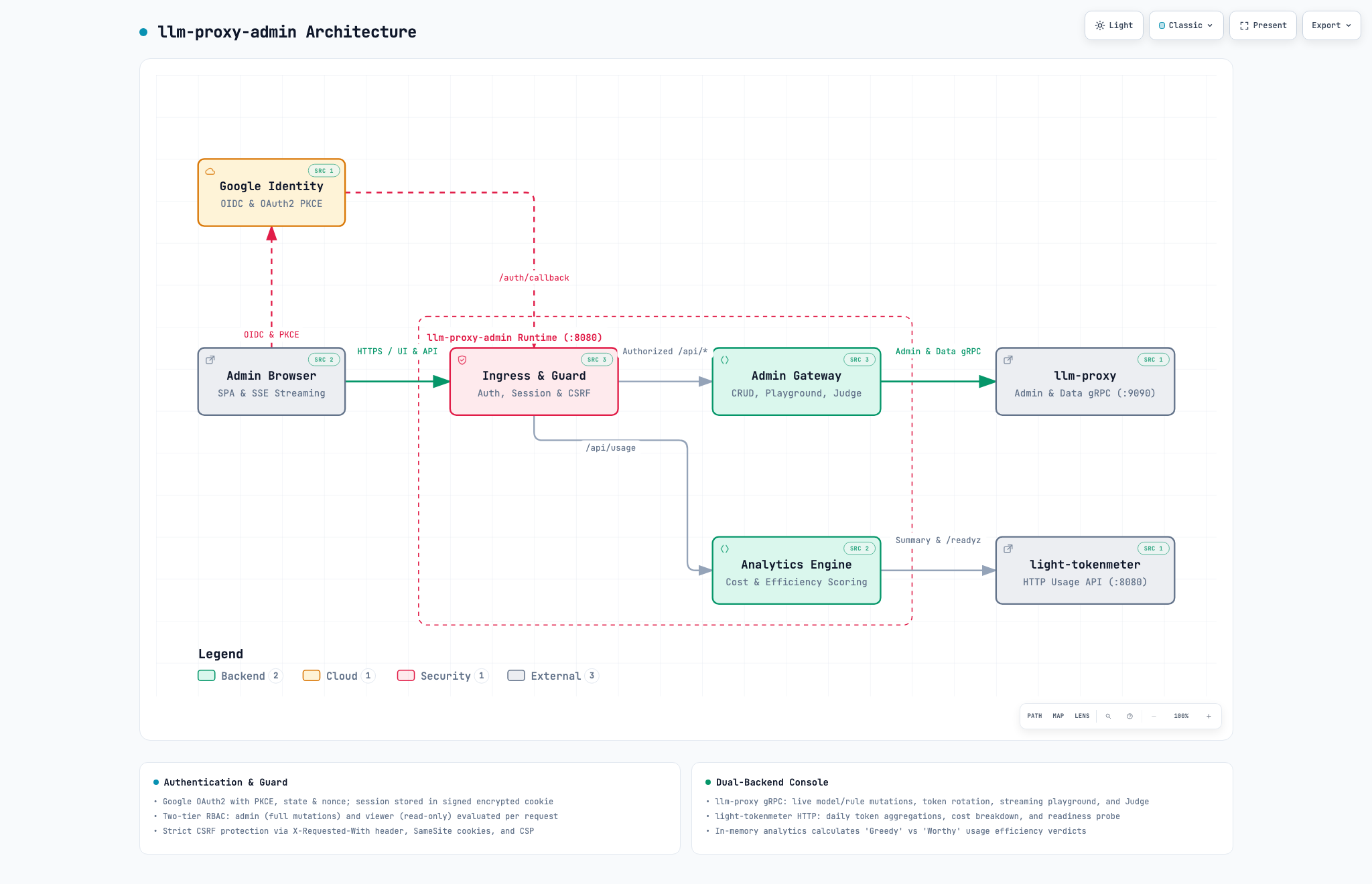
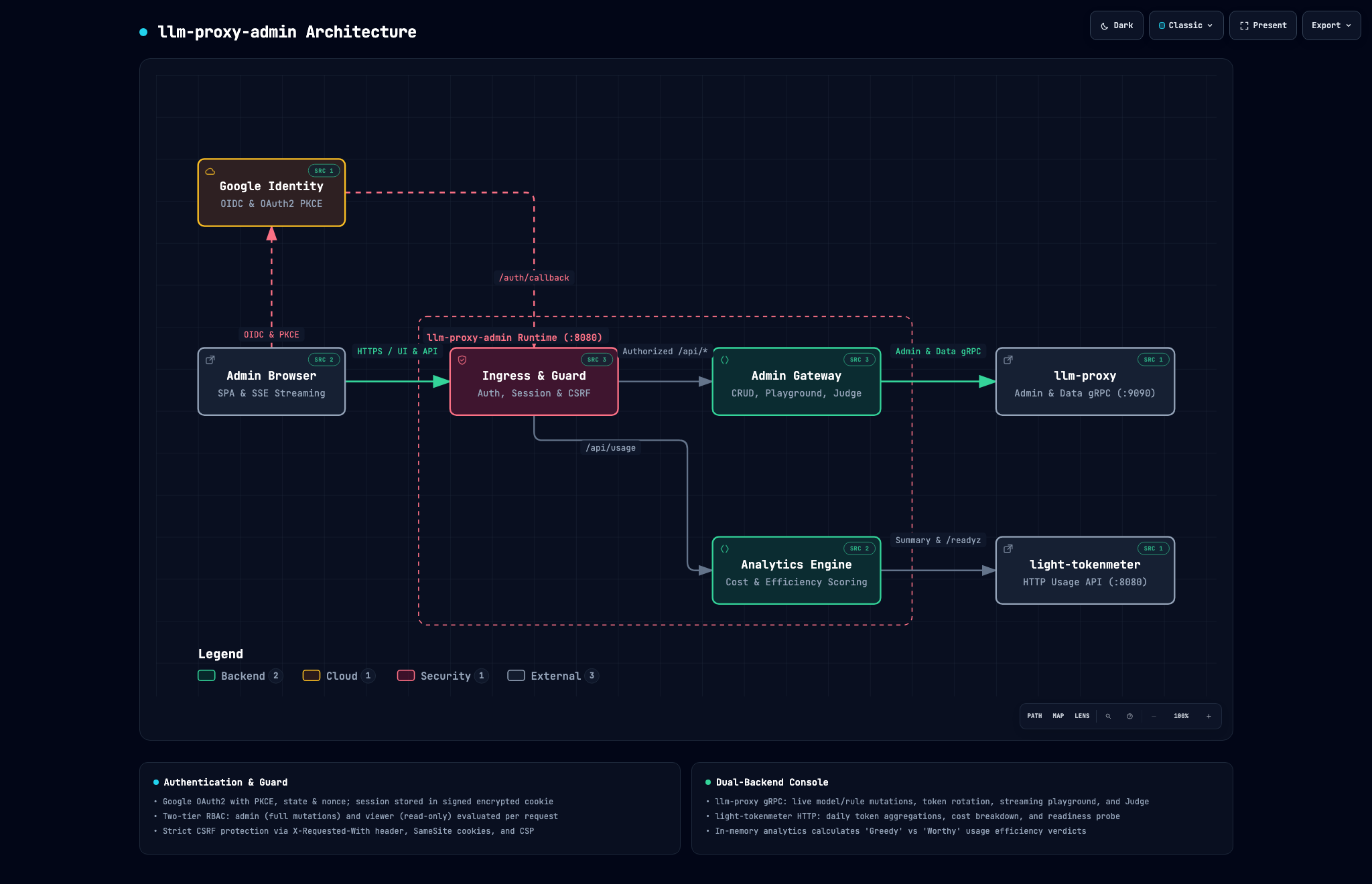
*Interactive diagram: diagrams/llm-proxy-admin.html |
Dark theme: diagrams/llm-proxy-admin-dark.png* |
Contents
- Quick start
- Setting up Google sign-in
- Who may sign in
- Running with one backend or both
- Configuration reference
- Deployment
- What the pages do
- Security model
- Development
Quick start
You need a Google OAuth client (how) and, for the gateway pages, an llm-proxy admin key (MintAPIKey with scope admin).
docker run -d --name llm-proxy-admin -p 8080:8080 \
  -e PUBLIC_URL=https://admin.example.com \
  -e GOOGLE_CLIENT_ID=… -e GOOGLE_CLIENT_SECRET=… \
  -e ALLOWED_EMAILS='*@example.com' \
  -e SESSION_SECRET="$(openssl rand -base64 36)" \
  -e LLM_PROXY_ADDR=llm-proxy:9090 -e LLM_PROXY_ADMIN_KEY=llm_… \
  -e TOKENMETER_URL=http://light-tokenmeter:8080 \
  coyl/llm-proxy-admin:latest
examples/compose.yaml starts the whole family (llm-proxy, light-tokenmeter, and this console on one Postgres) with first-run steps in its header.
Just looking around on your machine? Skip Google entirely, on localhost only:
docker run --rm -p 8081:8080 -e PUBLIC_URL=http://localhost:8081 -e INSECURE_NO_AUTH=true \
  -e TOKENMETER_URL=http://host.docker.internal:8080 coyl/llm-proxy-admin:latest
INSECURE_NO_AUTH is refused unless PUBLIC_URL host is localhost, 127.0.0.1, or [::1].
Setting up Google sign-in
- In the Google Cloud console create an OAuth client ID of type Web application (configure the consent screen first; Internal works if everyone is in your Google Workspace, otherwise External).
- Under Authorized redirect URIs add
PUBLIC_URL+/auth/callback, for examplehttps://admin.example.com/auth/callback(andhttp://localhost:8080/auth/callbackfor local tests). - Put the client id and secret into
GOOGLE_CLIENT_IDandGOOGLE_CLIENT_SECRET.
The console uses the authorization-code flow with PKCE, state, and nonce, and requires a verified e-mail. Only the openid email profile scopes are requested.
Who may sign in
ALLOWED_EMAILS is a comma- or space-separated list of patterns matched against the verified Google address, case-insensitively. * matches any run of characters within the part before or after the @, never across it.
| Pattern | Admits |
|---|---|
alice@example.com |
exactly that address |
*@example.com |
everyone at example.com (not x@sub.example.com) |
*@*.example.com |
everyone on any subdomain of example.com |
ops-*@example.com |
ops-eu@example.com, ops-us@example.com, … |
*@* |
every verified Google account (the explicit “open to all”, logged at start) |
Patterns need exactly one @; a bare * or example.com is rejected at startup so a typo can never open the door. An empty list admits nobody.
ALLOWED_EMAILSget full access.VIEWER_EMAILS(optional, same syntax) get a read-only console: they see usage, models, rules, and keys, but every change is refused. An address in both lists is an admin.- Lists are checked on every request, so removing someone ends their access immediately, not at session expiry. Changing a list needs a restart.
Running with one backend or both
The console shows only the pages whose backend you configured.
| You set | You get |
|---|---|
TOKENMETER_URL |
Usage page. Nothing else. |
LLM_PROXY_ADDR + LLM_PROXY_ADMIN_KEY |
Models, Rules, Keys, Nodes, Playground, Judge. |
| both | Everything, plus estimated cost on the usage page (tokens × the prices on your models; estimates use standard in/out prices and do not account for peak or batch rates). |
Configuration reference
| Variable | Default | Description |
|---|---|---|
PUBLIC_URL |
– | Required. External base URL, e.g. https://admin.example.com. |
GOOGLE_CLIENT_ID, GOOGLE_CLIENT_SECRET |
– | Required (unless INSECURE_NO_AUTH). |
ALLOWED_EMAILS |
– | Admin patterns. At least one of the two lists must be non-empty. |
VIEWER_EMAILS |
empty | Read-only patterns. |
SESSION_SECRET |
random | 32+ characters; signs the session cookie. Set it, or sessions end at every restart and cannot be shared between replicas. |
SESSION_TTL |
12h |
Session lifetime. |
LLM_PROXY_ADDR |
empty | host:port of llm-proxy’s gRPC endpoint. |
LLM_PROXY_ADMIN_KEY |
– | Key with the admin scope. Required with LLM_PROXY_ADDR. |
LLM_PROXY_TLS |
false |
Use TLS to reach llm-proxy. |
TOKENMETER_URL |
empty | Base URL of light-tokenmeter’s HTTP port. |
LISTEN_ADDR |
:8080 |
Listen address. |
LOG_LEVEL |
info |
debug, info, warn, error. |
INSECURE_NO_AUTH |
false |
Skip sign-in. Localhost PUBLIC_URL only. |
OIDC_ISSUER |
Advanced: another OpenID Connect issuer that returns verified e-mails. |
Deployment
- TLS. Terminate TLS in front of the console (Caddy, nginx, Traefik, load balancer) and set
PUBLIC_URLto thehttps://address. - Replicas. Stateless; run several with the same
SESSION_SECRET. - Health.
GET /healthzreturns200without authentication. - Network. The console must reach
llm-proxy’s gRPC port andlight-tokenmeter’s HTTP port; neither needs to be public.
A minimal Caddy configuration:
admin.example.com {
    reverse_proxy llm-proxy-admin:8080
}
What the pages do
- Usage (needs
light-tokenmeter): Pick a range (7/30/90 days or custom) and a grouping (project, model, user, action, vendor, or total). Shows tiles, a daily chart, and a breakdown table. Rows are labelled:- greedy: at least 10% of all tokens at 1.5× the average tokens per request or more, or at least 5% of all tokens with a fifth or more spent on failed requests.
- worthy: at least 1% of all tokens, at or below the average per request, with 5% failures or fewer. These are heuristics for spotting where to look, not accounting. They require two or more groups and at least five requests in the group.
- Models & Rules (need
llm-proxy): Add, edit, and delete registry models and routing rules with fullllm-proxytransactional validation. - Keys: Mint and revoke client API keys, assign write-only vendor credentials, and trigger
RotateEncryption. - Nodes: View registered local inference nodes, hardware/VRAM metrics, concurrency slots, and initiate graceful drain.
- Playground: Send a prompt or multi-turn conversation with real-time SSE streaming, tool call execution, interactive tool response submission, effort selection, and attributes (attributed to
console.playgroundand your email). - Judge: Evaluate arbitrary JSON state against calibrated NOUL (probability of condition being true), CHOICE (classification across options with confidence), and SCORE (ordered levels) criteria via the Judge RPC.
Security model
- Holds
llm-proxy’s admin key on the server; never reaches the browser. - Signed (
HMAC-SHA256),HttpOnly,SameSite=Lax, andSecure(whenPUBLIC_URLuses HTTPS) session cookies. - State-changing requests require the admin role, custom
X-Requested-Withheader, and same-originOrigin. - Strict Content-Security-Policy (
default-src 'self', no inline script or style), DOM built viah()withoutinnerHTML.
Development
make test    # go test -race ./...
make dev     # run on :8080 without Google sign-in (set LLM_PROXY_* and/or TOKENMETER_URL)
make proto   # regenerate internal/gen from proto/ (needs buf)