 ai-process
light-tokenmeter
Repository: ai-process/light-tokenmeter
Docker Hub: coyl/light-tokenmeter
A very small service that answers one question: who is spending your LLM tokens, and are they worth it? Your apps (or a gateway such as llm-proxy) push one event per model call; you query totals by project, user, action, vendor, model, or status and see who is greedy and who is worthy.
- One static Go binary, one Postgres table, an image of ~28 MB (
0.1.1, linux/amd64 uncompressed; ~11 MB download). No queue, no cache, no UI. - Append-only and idempotent. Every event has a UUID; sending it twice is harmless.
- Fast writes. Batches of up to 500 events are inserted with a single
COPY. - Flexible reads. Time-bucketed (per day) summaries with any combination of filters and groupings, plus aggregation over your own metadata (e.g. everything one batch job spent).
- Two APIs. HTTP/JSON for
curland dashboards, gRPC for services.
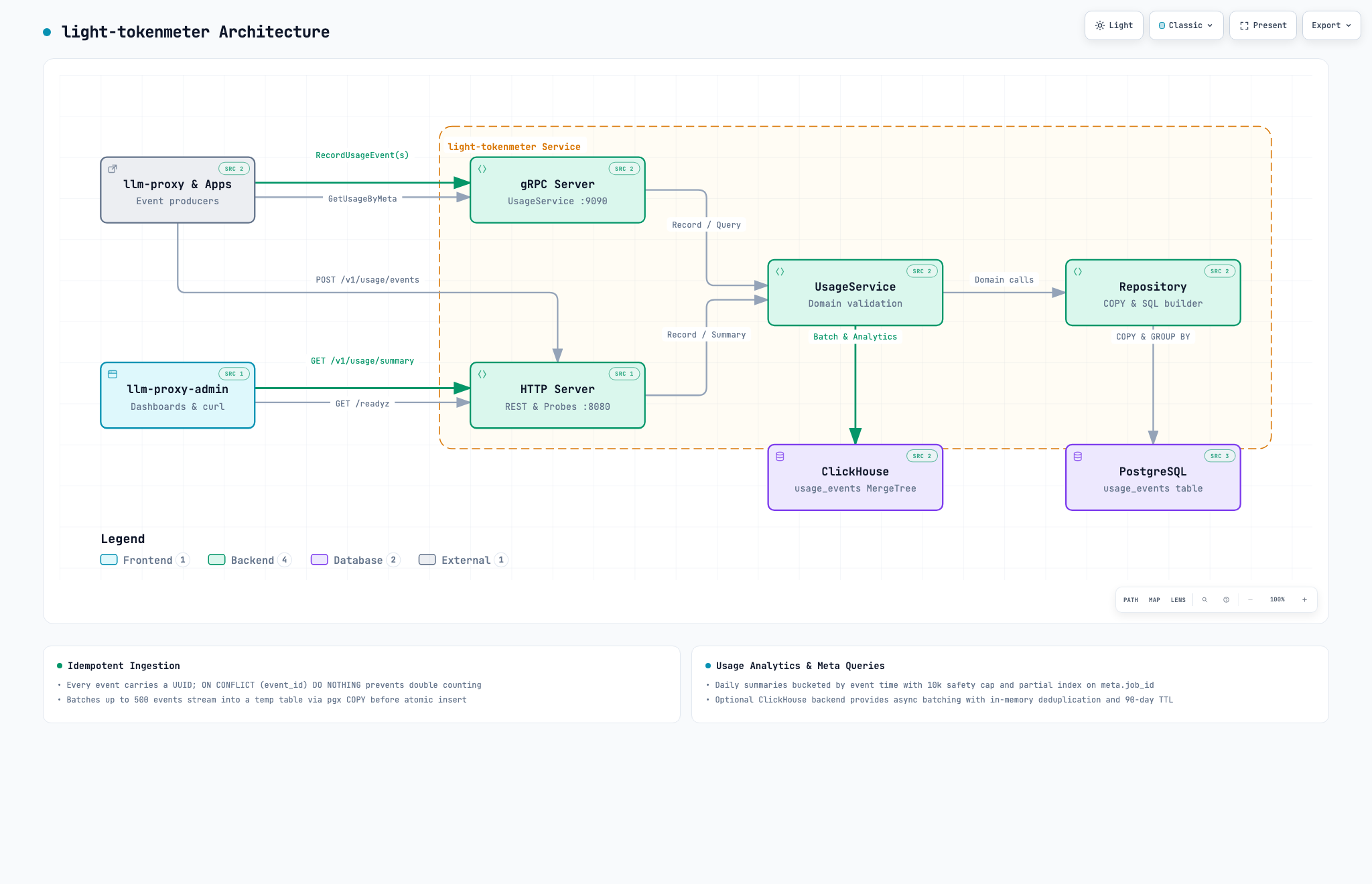
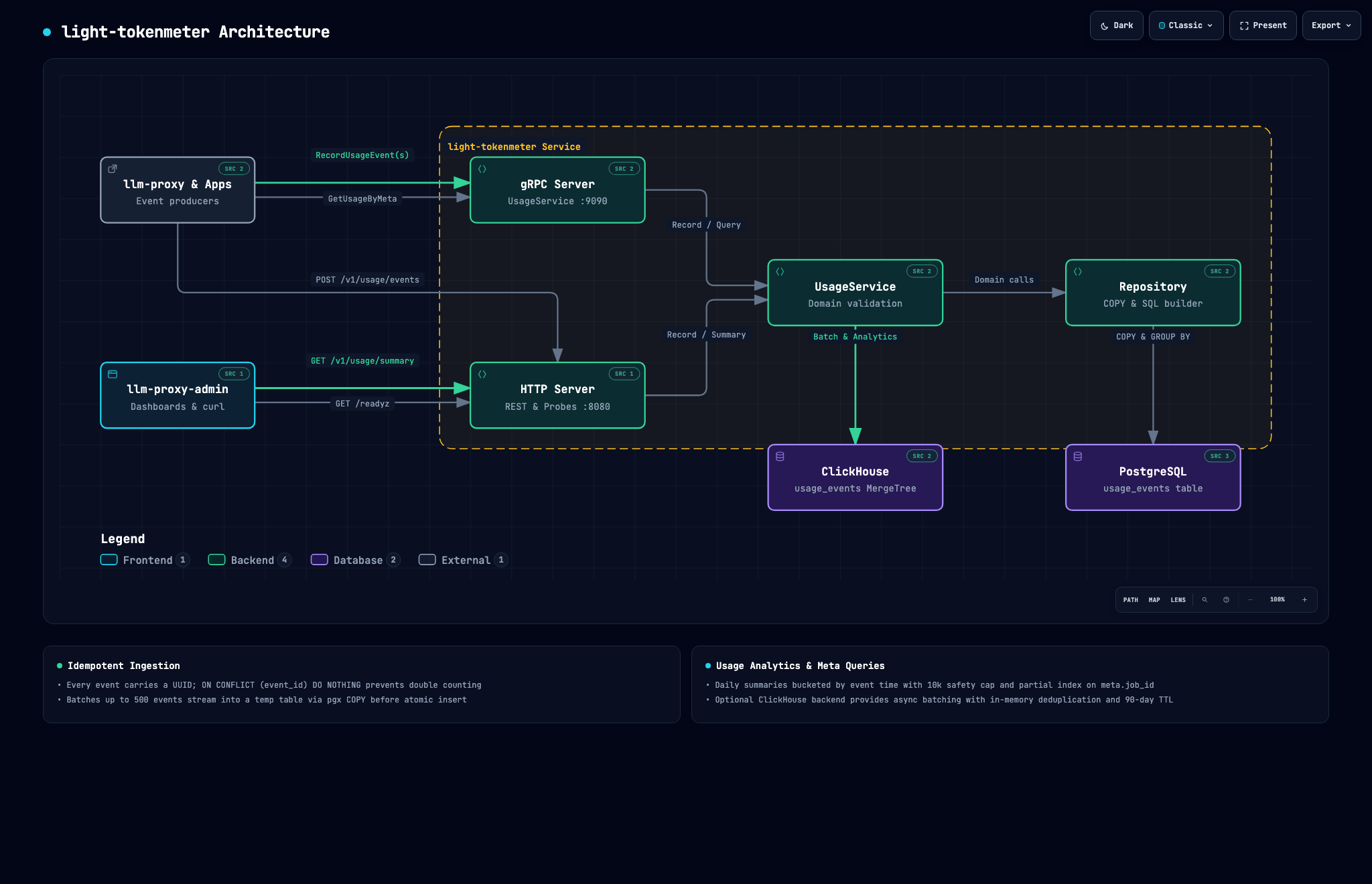
*Interactive diagram: diagrams/light-tokenmeter.html |
Dark theme: diagrams/light-tokenmeter-dark.png* |
Contents
- Quick start
- Installation
- Sending events
- Finding the greedy and the worthy
- API reference
- Configuration
- Security
- Operations & Development
Quick start
Requires Docker with the Compose plugin.
git clone https://github.com/ai-process/light-tokenmeter.git
cd light-tokenmeter
docker compose up --build -d
curl -s localhost:8080/readyz        # {"status":"ready"}
Record an event and read it back:
curl -s -X POST localhost:8080/v1/usage/events -H 'Content-Type: application/json' -d '{
  "event_id": "550e8400-e29b-41d4-a716-446655440000",
  "user_id": "user-123", "project_id": "support-bot", "action_id": "answer-ticket",
  "vendor": "openai", "model": "gpt-4o-mini", "status": "success",
  "duration_ms": 1234, "tokens_input": 150, "tokens_output": 300
}'

curl -s "localhost:8080/v1/usage/summary?from=2020-01-01T00:00:00Z&to=2100-01-01T00:00:00Z&group_by_project_id=true&group_by_model=true"
The schema is created automatically on startup.
Installation
Docker image
Release images are published for linux/amd64 and linux/arm64:
docker pull coyl/light-tokenmeter:latest # or pin a tag, e.g. coyl/light-tokenmeter:0.1.0
It needs only a Postgres database:
docker run -d --name light-tokenmeter \
  -p 8080:8080 -p 9090:9090 \
  -e DATABASE_URL='postgres://user:pass@db-host:5432/tokenmeter?sslmode=require' \
  coyl/light-tokenmeter:latest
Alongside your own stack:
services:
  light-tokenmeter:
    image: coyl/light-tokenmeter:latest
    restart: unless-stopped
    environment:
      DATABASE_URL: postgres://tokenmeter:${DB_PASSWORD}@db:5432/tokenmeter?sslmode=disable
    depends_on: [db]
    # no published ports: reach it from other containers at light-tokenmeter:8080 / :9090
Kubernetes: liveness probe GET :8080/healthz, readiness probe GET :8080/readyz (checks the database). The service is stateless, so run as many replicas as you like.
From source
Go 1.26+ and Postgres:
make build                                   # → bin/light-tokenmeter
export DATABASE_URL='postgres://tokenmeter:tokenmeter@localhost:5432/tokenmeter?sslmode=disable'
./bin/light-tokenmeter
Postgres retention
Any reasonably current Postgres works (16 is what the compose file uses). Create an empty database and a user that may create tables; migrations run on every start and are embedded in the binary. Table usage_events grows by one row per model call, so plan retention for your volume (for example a periodic DELETE ... WHERE created_at < now() - interval '13 months').
Sending events
An event describes one model call:
| Field | Type | Required | Description |
|---|---|---|---|
event_id |
UUID | yes | Idempotency key; a repeated id is ignored. |
user_id |
string ≤256 | yes | Who the call was for. |
project_id |
string ≤256 | yes | Which app or tenant. |
action_id |
string ≤256 | yes | What it was for, e.g. summarize-ticket. |
vendor |
string ≤64 | yes | openai, anthropic, google, … (free-form). |
model |
string ≤128 | yes | Model name. |
status |
string | yes | success, error, cancelled, or timeout. |
occurred_at |
RFC 3339 | no | When it happened; the server’s clock is used otherwise. |
duration_ms |
int | no | Call latency. |
tokens_input, tokens_output |
int | no | Token counts. |
tokens_total |
int | no | Defaults to input + output; if given it must equal that sum. |
error_class |
string | no | Normalised error class. |
vendor_http_status |
int | no | HTTP status returned by the vendor. |
meta |
map of string | no | Your own tags (keep it small), e.g. {"job_id": "…"}. |
Batches (POST /v1/usage/events:batch, or RecordUsageEvents over gRPC) take up to 500 events and report how many were created and how many were duplicates:
curl -s -X POST localhost:8080/v1/usage/events:batch -H 'Content-Type: application/json' -d '{
  "events": [
    {"event_id":"550e8400-e29b-41d4-a716-446655440001","user_id":"u1","project_id":"p1",
     "action_id":"a","vendor":"openai","model":"gpt-4o-mini","status":"success",
     "tokens_input":150,"tokens_output":300},
    {"event_id":"550e8400-e29b-41d4-a716-446655440002","user_id":"u2","project_id":"p1",
     "action_id":"a","vendor":"google","model":"gemini-2.5-flash","status":"error",
     "error_class":"rate_limited","vendor_http_status":429}
  ]}'
# {"created_count":2,"duplicate_count":0}
The service stores tokens, not money. Multiply by your own price list when you read the numbers (or view estimated costs automatically in llm-proxy-admin).
Finding the greedy and the worthy
GET /v1/usage/summary returns one row per day and per combination of the dimensions you group by. from (inclusive) and to (exclusive) are required, RFC 3339. Days and filters are evaluated against event time (occurred_at, falling back to created_at). If query results exceed 10,000 rows, responses include truncated: true and are capped at 10,000 rows.
Q='from=2026-09-01T00:00:00Z&to=2026-10-01T00:00:00Z'

# Which project burned the most?
curl -s "localhost:8080/v1/usage/summary?$Q&group_by_project_id=true"

# Which models does one project lean on?
curl -s "localhost:8080/v1/usage/summary?$Q&project_id=support-bot&group_by_model=true"

# Which actions are expensive per request, and which fail?
curl -s "localhost:8080/v1/usage/summary?$Q&group_by_action_id=true&group_by_status=true"

# The heaviest users of one model
curl -s "localhost:8080/v1/usage/summary?$Q&model=gpt-4o&group_by_user_id=true"
Each row carries tokens_input, tokens_output, tokens_total, request_count, and sum_duration_ms, so you can compute tokens per request, average latency, and error share yourself. The signals that usually separate greedy from worthy:
- high
tokens_total / request_counton a trivialaction_id(bloated prompts), - a large share of tokens spent on
status=errorortimeout(paying for failures), - an expensive model serving an
action_idthat a cheaper one handles equally well.
Filters: project_id, user_id, vendor, model, action_id, status (must be success, error, cancelled, or timeout; invalid returns 400).
Groupings: group_by_project_id, group_by_user_id, group_by_vendor, group_by_model, group_by_action_id, group_by_status (each =true).
Usage by your own metadata
If you tag events with a key such as job_id in meta, the gRPC call GetUsageByMeta returns everything that job spent, split by vendor and model and optionally by a second meta key (say task_id), plus an optional project_id filter. Lookups on meta.job_id are indexed via a partial expression index (meta ? 'job_id'). Responses return truncated: true if group rows exceed 10,000.
grpcurl -plaintext -d '{"meta_key":"job_id","meta_value":"job-42","group_by_meta_key":"task_id"}' \
  localhost:9090 usage.v1.UsageService/GetUsageByMeta
gRPC reflection is enabled, so grpcurl does not require .proto files.
API reference
HTTP (:8080)
| Method | Path | Description |
|---|---|---|
POST |
/v1/usage/events |
Record one event. |
POST |
/v1/usage/events:batch |
Record up to 500 events. |
GET |
/v1/usage/summary |
Aggregated usage, see above. |
GET |
/healthz |
Liveness. |
GET |
/readyz |
Readiness (database ping). |
Errors are returned as JSON with the format {"error": "...", "code": "...", "details": "..."}, where code is invalid_json, validation_error, or internal_error.
gRPC (:9090)
usage.v1.UsageService: RecordUsageEvent, RecordUsageEvents, GetUsageSummary, GetUsageByMeta.
Configuration
A .env file in the working directory is loaded automatically if present.
| Variable | Default | Description |
|---|---|---|
DATABASE_URL |
local dev URL | Postgres connection string. Always set it. |
GRPC_ADDR |
:9090 |
gRPC listen address. |
HTTP_ADDR |
:8080 |
HTTP listen address. |
LOG_LEVEL |
info |
debug, info, warn, error. |
LOG_FORMAT |
json |
Log format: json (structured JSON on stdout) or console (colored human-readable). |
SHUTDOWN_TIMEOUT |
30s |
Graceful shutdown window. |
DB_MAX_CONNS / DB_MIN_CONNS |
25 / 5 |
Connection pool bounds per replica. |
SENTRY_DSN |
empty | Error reporting; empty disables it. |
SENTRY_ENVIRONMENT / SENTRY_RELEASE |
development / empty |
Sentry metadata. |
SENTRY_ENABLE_TRACING |
false |
Sentry performance tracing. |
SENTRY_DEBUG |
false |
Enable Sentry SDK debug logging. |
SENTRY_WITH_BREADCRUMBS |
false |
Include breadcrumbs in Sentry error reports. |
CLICKHOUSE_ENABLED |
false |
Enable ClickHouse for async batch storage and high-scale analytics. |
CLICKHOUSE_ADDR |
localhost:9000 |
ClickHouse native TCP address. |
CLICKHOUSE_DATABASE |
tokenmeter |
ClickHouse database name. |
CLICKHOUSE_USER |
default |
ClickHouse user. |
CLICKHOUSE_PASSWORD |
empty | ClickHouse password. |
CLICKHOUSE_BATCH_SIZE |
5000 |
Maximum number of events to buffer before flushing to ClickHouse. |
CLICKHOUSE_FLUSH_INTERVAL |
1s |
Maximum time to buffer events before flushing to ClickHouse. |
Security
There is no authentication. Anyone who can reach the ports can write and read usage data. Run it on a private network, or put it behind a reverse proxy or API gateway that enforces auth and TLS (Envoy, nginx, Caddy, a service mesh). Do not publish ports 8080/9090 on a public interface. Events can contain whatever you put in user_id and meta; avoid storing personal data you would not want persisted in a database.
Operations & Development
make test        # go test -race ./...
make build       # bin/light-tokenmeter
make proto       # regenerate gen/ (needs buf)
docker compose up --build